Switched Bouncing Ball
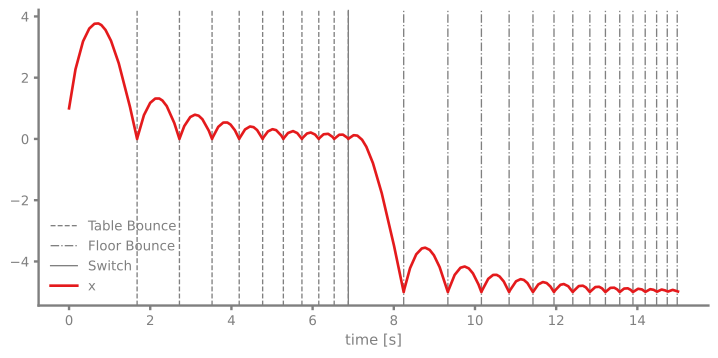
This example demonstrates advanced event handling with multiple simultaneous events, event switching, and conditional event logic. The bouncing ball bounces on a table first, and then drops to the floor and continues to bounce there.
You can also find this example as a single file in the GitHub repository.
This example showcases:
- Multiple ZeroCrossing events tracking different conditions - Condition events for conditional logic (count-based switching) - Dynamic event activation/deactivation using on()/off() methods - Nonlinear friction forces modeled with the Function block
First let's import the Simulation and Connection classes along with the required blocks and event managers:
System Dynamics
The ball experiences:
- Gravitational acceleration downward
- Quadratic air resistance (Newton's drag law)
- Elastic bounces at MATHINLINE1ENDMATH (floor) and MATHINLINE2ENDMATH (ceiling)
The equation of motion is:
MATHDISPLAY0ENDMATH
where MATHINLINE3ENDMATH is the mass-normalized friction coefficient.
Block Diagram Construction
Event Managers
We define three events:
1. E1: Table bounce at $x = 0$ (ZeroCrossing) 2. E2: Floor bounce at $x = -5$ (ZeroCrossing) 3. E3: Conditional switch after 10 floor bounces (Condition)
The third event uses the Condition event type, which triggers based on a boolean condition rather than a zero crossing. Here it counts table bounces and disables detection after 10 occurrences:
The condition event checks if the table bounce event E1 has occurred 10 times. When this happens, it:
- Disables table bounce tracking with
E1.off() - Disables itself with
E3.off()
After this point, only the flfoor bounce E2 remains active.
We initialize the simulation with the adaptive timestep RKBS32 solver (Runge-Kutta-Bogacki-Shampine 3(2) method) to enable backtracking for the event system to resolve event locations in time:
12:44:08 - INFO - LOGGING (log: True)
12:44:08 - INFO - BLOCKS (total: 6, dynamic: 2, static: 4, eventful: 0)
12:44:08 - INFO - GRAPH (nodes: 6, edges: 6, alg. depth: 3, loop depth: 0, runtime: 0.076ms)
Now let's run the simulation:
12:44:08 - INFO - STARTING -> TRANSIENT (Duration: 15.00s)
12:44:08 - INFO - --------------------   1% | 0.0s<0.1s | 2644.1 it/s
12:44:08 - INFO - ####----------------  20% | 0.0s<0.1s | 3588.5 it/s
12:44:08 - INFO - ########------------  40% | 0.1s<0.1s | 3833.1 it/s
12:44:08 - INFO - ############--------  60% | 0.1s<0.0s | 3502.6 it/s
12:44:08 - INFO - ################----  80% | 0.2s<0.0s | 3594.9 it/s
12:44:08 - INFO - #################### 100% | 0.3s<--:-- | 3937.0 it/s
12:44:08 - INFO - FINISHED -> TRANSIENT (total steps: 862, successful: 595, runtime: 255.70 ms)
Results
Let's plot the results with all three event types marked differently:
Analysis
The plot reveals several interesting behaviors:
- Initial phase: The ball bounces on the table floor (MATHINLINE0ENDMATH, dashed lines)
- Switch event: After 10 table bounces, the conditional event triggers (solid vertical line)
- Post-switch phase: Table bounces are no longer detected, so the ball passes through the table and falls to the floor where it continues to bounce
- Energy dissipation: Due to air resistance, the amplitude decreases over time
This demonstrates how event logic can dynamically change system behavior during simulation, useful for:
- Mode switching in control systems
- Modeling wear or failure after a certain number of cycles
- Implementing complex state machines
Event Counts
We can also check how many times each event occurred:
Table bounces (E1): 10
Floor bounces (E2): 15
Switch events (E3): 1
As expected, E1 should have exactly 10 events (the trigger condition), E3 should have 1 event (when it disabled itself), and E2 will vary depending on the system dynamics.