Spectrum Analysis
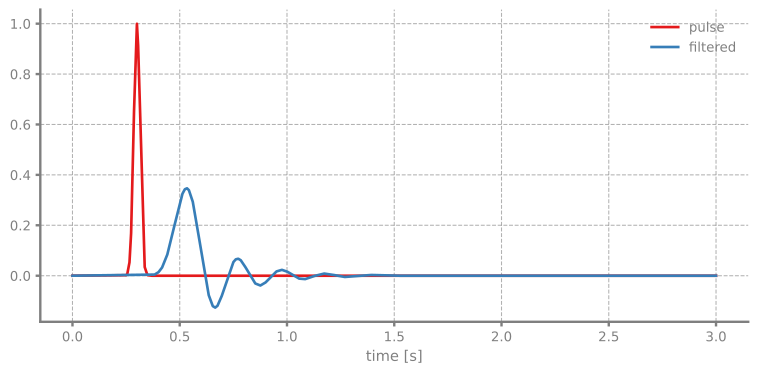
In this example we demonstrate frequency domain analysis using PathSim's spectrum block. We'll examine the frequency response of a Butterworth lowpass filter by analyzing its response to a Gaussian pulse.
You can also find this example as a single file in the GitHub repository.
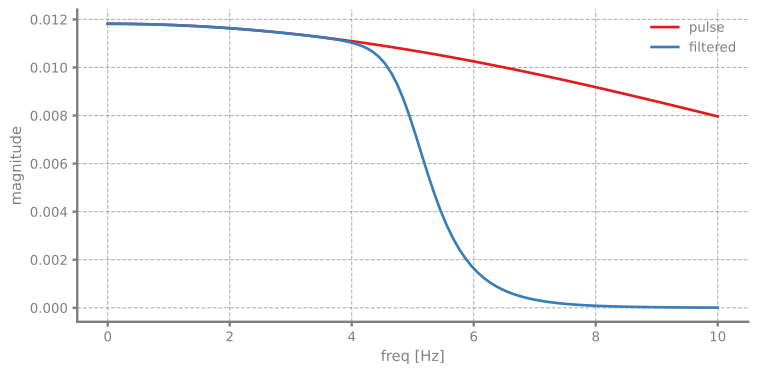
The Spectrum block computes the frequency domain representation of signals during simulation, allowing us to recover the frequency response of linear systems without explicit frequency domain analysis.
First let's import the Simulation and Connection classes along with the required blocks:
System Setup
We'll create a simple signal chain:
- A Gaussian pulse source with controllable bandwidth
- A Butterworth lowpass filter
- Scope and Spectrum blocks to observe time and frequency domain behavior
The Spectrum block is configured with a frequency array that defines which frequencies to analyze. The GaussianPulseSource provides a rich frequency content suitable for system identification.
We initialize the simulation with the RKCK54 solver (Runge-Kutta-Cash-Karp 5(4) method) for accurate integration of the filter dynamics:
12:44:03 - INFO - LOGGING (log: True)
12:44:03 - INFO - BLOCKS (total: 4, dynamic: 2, static: 2, eventful: 0)
12:44:03 - INFO - GRAPH (nodes: 4, edges: 5, alg. depth: 1, loop depth: 0, runtime: 0.078ms)
Now let's run the simulation:
12:44:03 - INFO - STARTING -> TRANSIENT (Duration: 3.00s)
12:44:03 - INFO - --------------------   3% | 0.0s<0.2s | 396.0 it/s
12:44:03 - INFO - ####----------------  20% | 0.1s<0.2s | 1588.7 it/s
12:44:03 - INFO - ########------------  40% | 0.1s<0.1s | 1633.2 it/s
12:44:03 - INFO - ############--------  60% | 0.1s<0.0s | 1583.0 it/s
12:44:03 - INFO - ################----  80% | 0.1s<0.0s | 1665.3 it/s
12:44:03 - INFO - #################### 100% | 0.2s<--:-- | 1725.0 it/s
12:44:03 - INFO - FINISHED -> TRANSIENT (total steps: 204, successful: 174, runtime: 152.02 ms)
Frequency Response Recovery
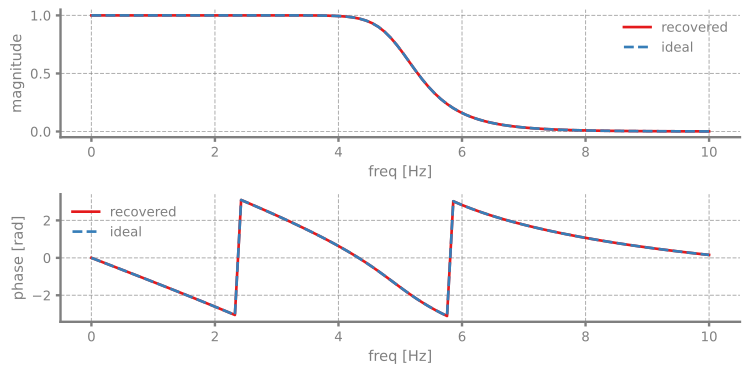
One powerful feature is that we can recover the frequency response of the filter by taking the ratio of the output spectrum to the input spectrum:
We can compare this recovered response with the ideal frequency response calculated from the filter's state-space representation. The ButterworthLowpassFilter stores its state-space matrices as A, B, C, D:
Now let's plot the comparison between the recovered and ideal frequency responses: