Checkpoints
PathSim supports saving and loading simulation state via checkpoints. This allows you to pause a simulation, save its complete state to disk, and resume it later from exactly where you left off.
Checkpoints also enable rollback — returning to a saved state and exploring different what-if scenarios by changing parameters.
Checkpoints use a split format: a JSON file for metadata and structure, and an NPZ file for numerical data (block states, solver histories, etc.).
Building the System
We'll use the coupled oscillators system to demonstrate checkpoints. The energy exchange between the two oscillators produces a sustained, non-trivial response that makes it easy to visually verify checkpoint continuity.
First let's import the Simulation and Connection classes and the required blocks:
Define the system parameters:
Define the differential equations for each oscillator using ODE blocks and the coupling force using a Function block:
Create the Simulation and run for 60 seconds:
12:43:21 - INFO - LOGGING (log: True)
12:43:21 - INFO - BLOCKS (total: 4, dynamic: 2, static: 2, eventful: 0)
12:43:21 - INFO - GRAPH (nodes: 4, edges: 6, alg. depth: 2, loop depth: 0, runtime: 0.051ms)
12:43:21 - INFO - STARTING -> TRANSIENT (Duration: 60.00s)
12:43:21 - INFO - --------------------   1% | 0.0s<0.7s | 8075.5 it/s
12:43:21 - INFO - ####----------------  20% | 0.2s<0.5s | 10468.5 it/s
12:43:22 - INFO - ########------------  40% | 0.3s<0.3s | 10936.4 it/s
12:43:22 - INFO - ############--------  60% | 0.4s<0.1s | 16323.0 it/s
12:43:22 - INFO - ################----  80% | 0.5s<0.1s | 8633.1 it/s
12:43:22 - INFO - #################### 100% | 0.7s<--:-- | 9600.5 it/s
12:43:22 - INFO - FINISHED -> TRANSIENT (total steps: 6001, successful: 6001, runtime: 674.86 ms)
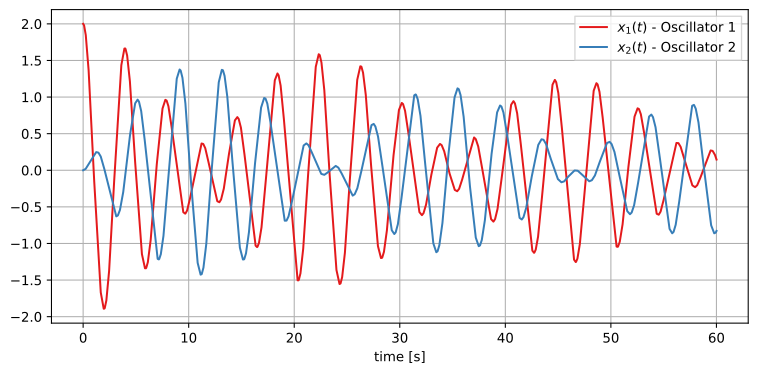
The two oscillators exchange energy through the coupling spring, producing a characteristic beat pattern.
Saving a Checkpoint
Now let's save the simulation state at t=60s. This creates two files: coupled.json (metadata) and coupled.npz (numerical data).
Checkpoint saved at t = 60.0s
We can inspect the JSON file to see what was saved:
PathSim version: 0.22.2
Simulation time: 60.0s
Solver: SSPRK22
Blocks saved:
  ODE_0 (ODE)
  ODE_1 (ODE)
  Function_0 (Function)
  Scope_0 (Scope)
Blocks are identified by type and insertion order (ODE_0, ODE_1, etc.), so the checkpoint can be loaded into any simulation with the same block structure, regardless of the specific Python objects.
Rollback: What-If Scenarios
This is where checkpoints really shine. We'll load the same checkpoint three times with different coupling strengths to explore how the system evolves from the exact same state.
Since the checkpoint restores all block states by type and insertion order, we just need to rebuild the simulation with the same block structure but different parameters.
12:43:22 - INFO - LOGGING (log: True)
12:43:22 - INFO - BLOCKS (total: 4, dynamic: 2, static: 2, eventful: 0)
12:43:22 - INFO - GRAPH (nodes: 4, edges: 6, alg. depth: 2, loop depth: 0, runtime: 0.054ms)
12:43:22 - INFO - STARTING -> TRANSIENT (Duration: 60.00s)
12:43:22 - INFO - --------------------   1% | 0.0s<0.7s | 8548.7 it/s
12:43:22 - INFO - ####----------------  20% | 0.1s<0.5s | 9474.4 it/s
12:43:23 - INFO - ########------------  40% | 0.3s<0.4s | 8662.1 it/s
12:43:23 - INFO - ############--------  60% | 0.4s<0.3s | 9471.9 it/s
12:43:23 - INFO - ################----  80% | 0.6s<0.1s | 8234.2 it/s
12:43:23 - INFO - #################### 100% | 0.7s<--:-- | 7965.0 it/s
12:43:23 - INFO - FINISHED -> TRANSIENT (total steps: 6000, successful: 6000, runtime: 708.08 ms)
12:43:23 - INFO - LOGGING (log: True)
12:43:23 - INFO - BLOCKS (total: 4, dynamic: 2, static: 2, eventful: 0)
12:43:23 - INFO - GRAPH (nodes: 4, edges: 6, alg. depth: 2, loop depth: 0, runtime: 0.051ms)
12:43:23 - INFO - STARTING -> TRANSIENT (Duration: 60.00s)
12:43:23 - INFO - --------------------   1% | 0.0s<0.9s | 6822.7 it/s
12:43:23 - INFO - ####----------------  20% | 0.2s<0.6s | 8125.2 it/s
12:43:23 - INFO - ########------------  40% | 0.3s<0.4s | 9719.0 it/s
12:43:23 - INFO - ############--------  60% | 0.4s<0.3s | 9490.3 it/s
12:43:24 - INFO - ################----  80% | 0.6s<0.1s | 8614.8 it/s
12:43:24 - INFO - #################### 100% | 0.7s<--:-- | 8571.0 it/s
12:43:24 - INFO - FINISHED -> TRANSIENT (total steps: 6000, successful: 6000, runtime: 712.54 ms)
12:43:24 - INFO - LOGGING (log: True)
12:43:24 - INFO - BLOCKS (total: 4, dynamic: 2, static: 2, eventful: 0)
12:43:24 - INFO - GRAPH (nodes: 4, edges: 6, alg. depth: 2, loop depth: 0, runtime: 0.045ms)
12:43:24 - INFO - STARTING -> TRANSIENT (Duration: 60.00s)
12:43:24 - INFO - --------------------   1% | 0.0s<0.6s | 9266.1 it/s
12:43:24 - INFO - ####----------------  20% | 0.1s<0.6s | 8704.6 it/s
12:43:24 - INFO - ########------------  40% | 0.3s<0.4s | 10016.6 it/s
12:43:24 - INFO - ############--------  60% | 0.4s<0.2s | 10011.1 it/s
12:43:24 - INFO - ################----  80% | 0.6s<0.1s | 8865.0 it/s
12:43:24 - INFO - #################### 100% | 0.7s<--:-- | 8632.7 it/s
12:43:24 - INFO - FINISHED -> TRANSIENT (total steps: 6000, successful: 6000, runtime: 698.47 ms)
Comparing the Scenarios
The plot shows the original run (0-60s) followed by three different futures branching from the checkpoint at t=60s. We show oscillator 1 for clarity.
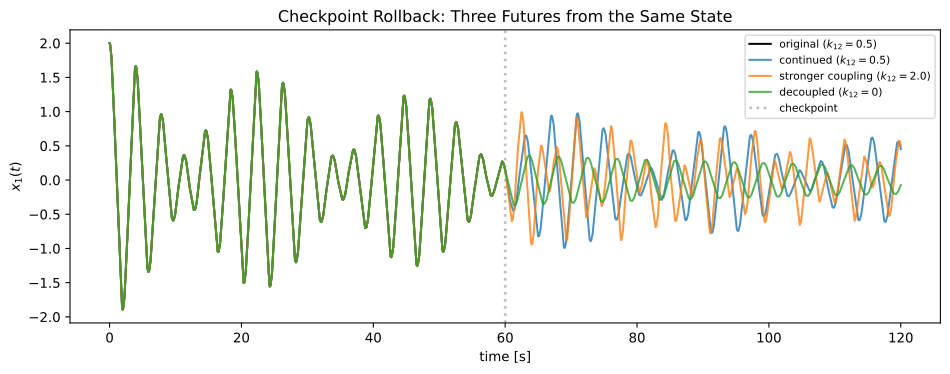
All three scenarios start from the exact same state at t=60s. The blue continuation matches the original trajectory perfectly, confirming checkpoint fidelity. The stronger coupling (orange) produces faster energy exchange, while the decoupled system (green) oscillates independently at its natural frequency.