Bouncing Ball
Simulation of a bouncing ball using PathSim's event handling system.
You can also find this example as a single file in the GitHub repository.
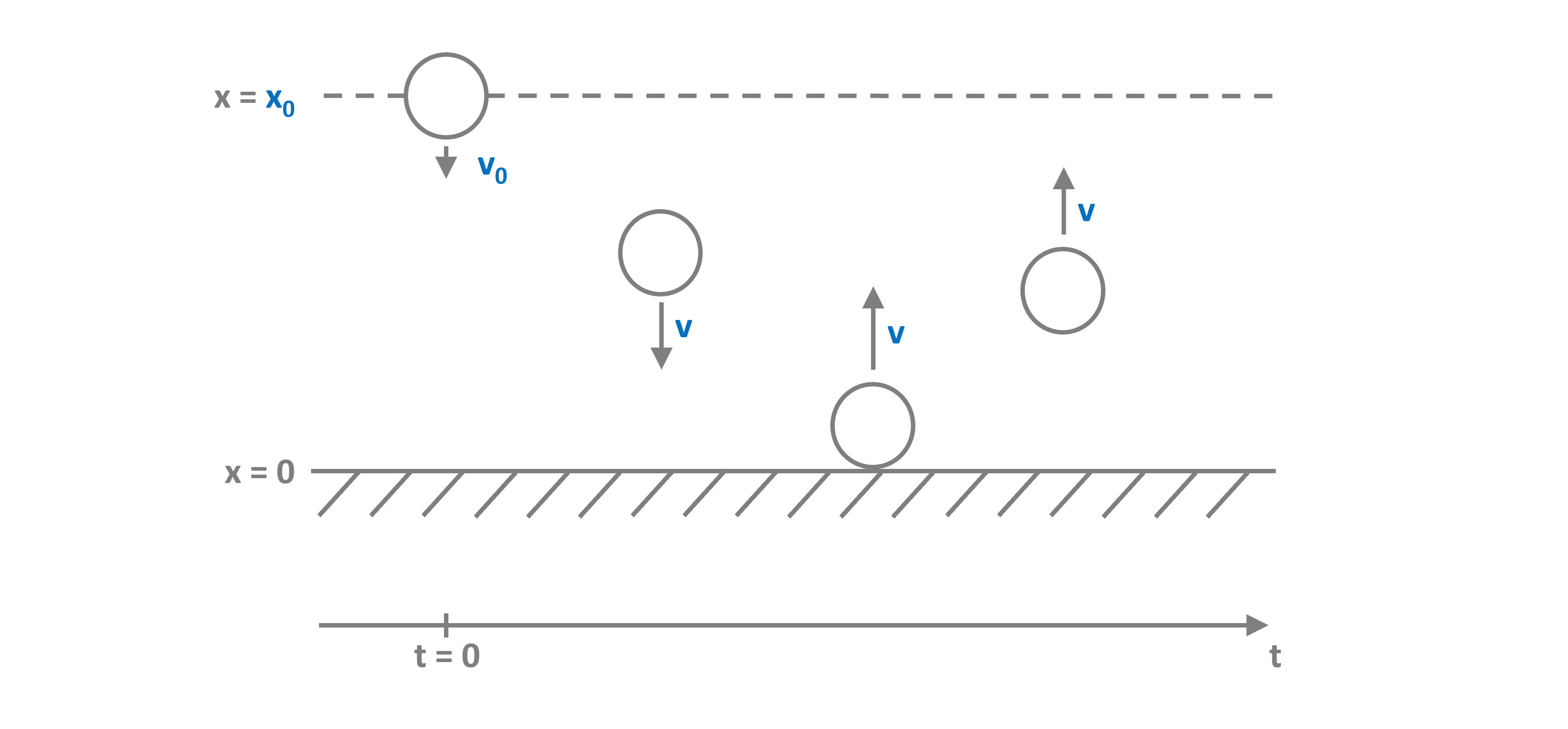
Systems like this require the location and resolution of discrete events within the timestep and are not easily solved with standard numerical ODE solvers. PathSim implements an event management system that can track the system state and locate and resolve specified events.
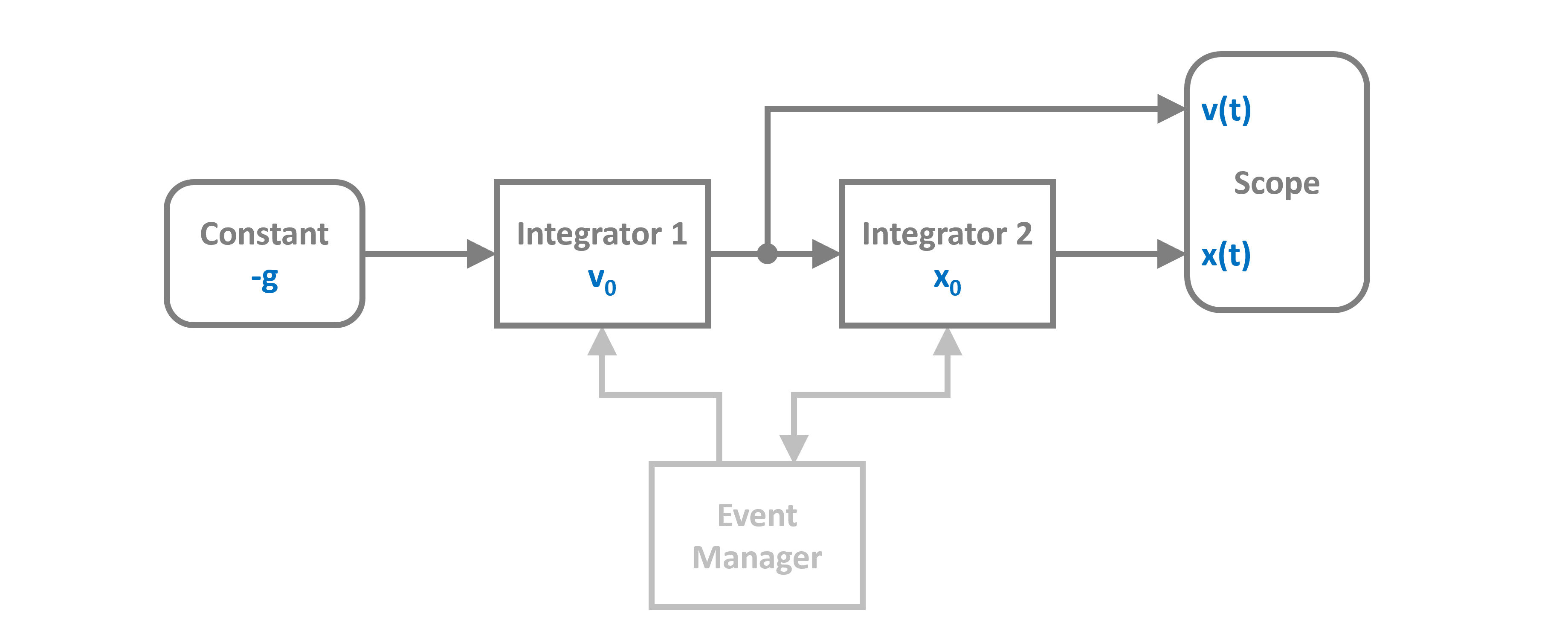
We can translate the dynamics of the system into a block diagram. Note the event manager that watches the state of the integrator for the position and can act on both integrator states:
Import and Setup
To simulate the bouncing ball, let's start by importing the required blocks from the block library. In this case integrators and a constant for gravity.
And of course the ZeroCrossing event manager from the event library.
System Parameters
Then define the system parameters:
System Definition
Now we can construct the system by instantiating the blocks we need (from the block diagram above) with their corresponding parameters and collect them together in a list:
Event Handling
Now the continuous system dynamics are defined. Without any additions, the ball would just accelerate indefinitely even past the floor. To implement the bounce, we need to define a zero crossing event tracker that watches the position and can detect when it changes its sign.
In PathSim events are defined by their type and an event function that is evaluated to determine whether an event has occurred and how close to the timestep it is and an action function that gets called to resolve the event once it is located to sufficient accuracy.
Here the event function just watches the state of the integrator Ix, i.e. the position and if it crosses the origin, the action function flips the sign of the velocity, i.e. the state of integrator Iv multiplied by the elasticity constant (loses some energy at the bounce):
Simulation Setup and Execution
Now the hybrid dynamical system consisting of the blocks, connections and discrete events is fully defined. Next, we can initialize the simulation and set some tolerances.
We use an adaptive timestep ODE solver RKBS32 (it's essentially the same as MATLAB's ode23) so the event management system can use backtracking to accurately locate the events. Finally we can run the simulation for some duration.
12:43:14 - INFO - LOGGING (log: True)
12:43:14 - INFO - BLOCKS (total: 4, dynamic: 2, static: 2, eventful: 0)
12:43:14 - INFO - GRAPH (nodes: 4, edges: 3, alg. depth: 1, loop depth: 0, runtime: 0.045ms)
12:43:14 - INFO - STARTING -> TRANSIENT (Duration: 10.00s)
12:43:14 - INFO - --------------------   1% | 0.0s<0.1s | 2488.7 it/s
12:43:14 - INFO - ####----------------  20% | 0.0s<0.1s | 2722.6 it/s
12:43:14 - INFO - ########------------  40% | 0.1s<0.0s | 3913.4 it/s
12:43:14 - INFO - ############--------  60% | 0.1s<0.0s | 3361.1 it/s
12:43:14 - INFO - ################----  80% | 0.2s<0.0s | 3525.3 it/s
12:43:14 - INFO - #################### 100% | 0.2s<--:-- | 3280.8 it/s
12:43:14 - INFO - FINISHED -> TRANSIENT (total steps: 415, successful: 363, runtime: 187.25 ms)
Results
Due to the object-oriented and decentralized architecture of PathSim, the scope block holds the time series data directly. Reading the recorded data is as easy as:
And plotting the results in an external matplotlib window is also straightforward:
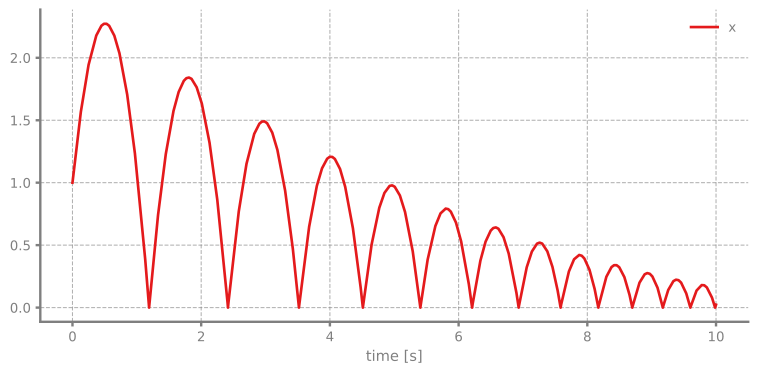
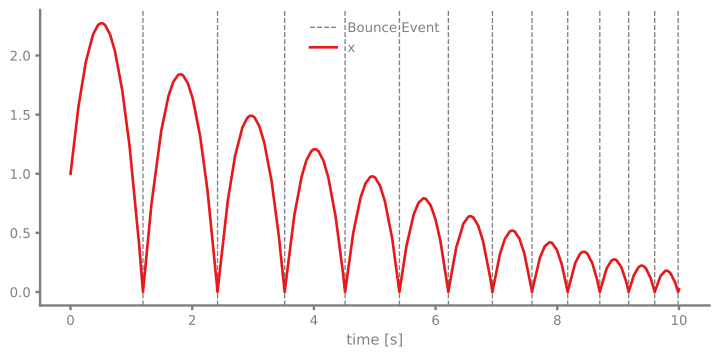
We can also add the detected events to the plot by just iterating the event instance:
Timestep Evolution
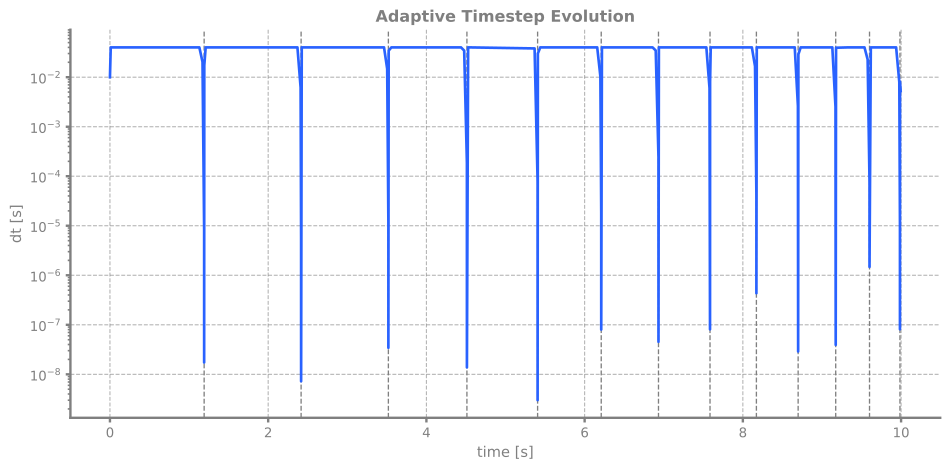
For educational purposes it might be interesting to have a look at the evolution of the timestep.
We can clearly see how the adaptive integrator in combination with the event handling system approaches the event location with smaller steps and once located takes larger steps again until the next event is in sight. And so on.