FMI 3.0 Export
Writing a model out as a Functional Mock-up Unit, for both interface types, and packaging a subsystem as a reusable component.
What gets written
FMI is an open standard for moving simulation models between tools. to_fmu writes an FMI 3.0 source FMU: the model is lowered to C, wrapped in the FMI C layer, and zipped with a generated modelDescription.xml and buildDescription.xml.
Source FMU means the archive carries C rather than binaries, so the importing tool compiles it for its own platform.
One archive offers both interfaces:
- Model Exchange — the FMU hands out MATHINLINE0ENDMATH and the importer integrates it.
- Co-Simulation — the FMU integrates itself, with the solver baked in at export time, and the importer just advances it.
Simulation.to_fmu() exports a whole model. A Subsystem has to_fmu too, which is how a component with input and output ports is packaged on its own.
The Model
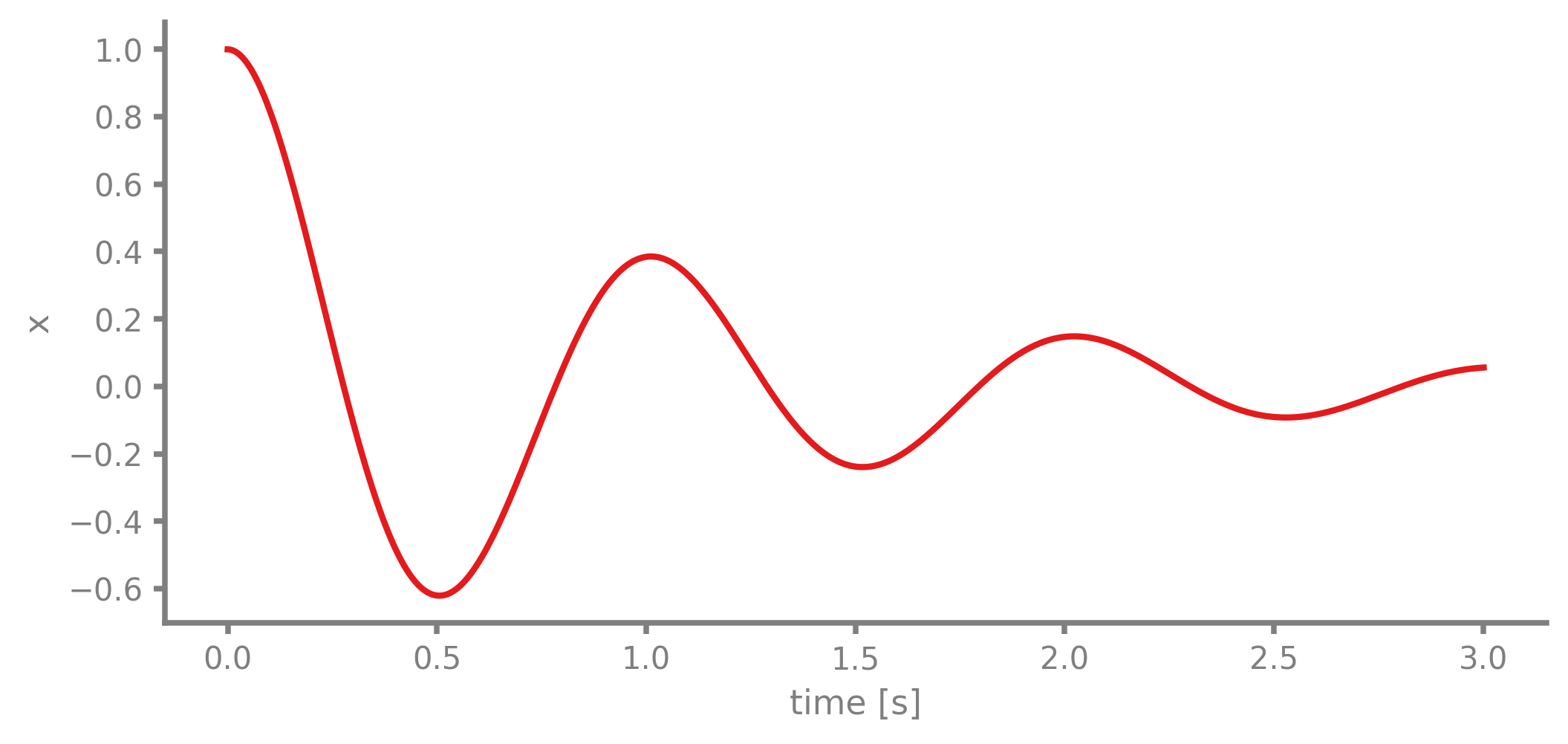
A damped harmonic oscillator, which has a closed-form solution to check against:
MATHDISPLAY0ENDMATH
System Parameters
Block Diagram
Simulation
The reference run, before exporting anything.
Export
The keyword arguments become the default experiment in modelDescription.xml — what an importer uses when the user does not say otherwise.
modelDescription.xml
sources/buildDescription.xml
sources/fmi3.h
sources/fmu.c
sources/oscillator.c
sources/oscillator.h
What the Importer Sees
modelDescription.xml declares the interfaces on offer and the variables. Both <ModelExchange> and <CoSimulation> are there.
fmiVersion="3.0"
<ModelExchange modelIdentifier="oscillator" needsCompletedIntegratorStep="false" providesDirectionalDerivative
<CoSimulation modelIdentifier="oscillator" canHandleVariableCommunicationStepSize="true" hasEventMode="false"
<Float64 name="time" valueReference="6" causality="independent" variability="continuous" description="Simulati
<Float64 name="ODE_x0" valueReference="0" causality="local" variability="continuous" initial="exact" start="1"
<Float64 name="der(ODE_x0)" valueReference="4" causality="local" variability="continuous" initial="calculated"
<Float64 name="ODE_x1" valueReference="1" causality="local" variability="continuous" initial="exact" start="0"
<Float64 name="der(ODE_x1)" valueReference="5" causality="local" variability="continuous" initial="calculated"
<Float64 name="ODE_y0" valueReference="2" causality="output" variability="continuous" initial="calculated"/>
<Float64 name="ODE_y1" valueReference="3" causality="output" variability="continuous" initial="calculated"/>
Running It Back
FMPy is an independent FMI implementation, so it is a good way to check that the FMU really is one. It builds the C for this platform first, since a source FMU ships none.
validate_fmu: no problems
  fmiVersion    3.0
  ModelExchange True
  CoSimulation  True
Model Exchange
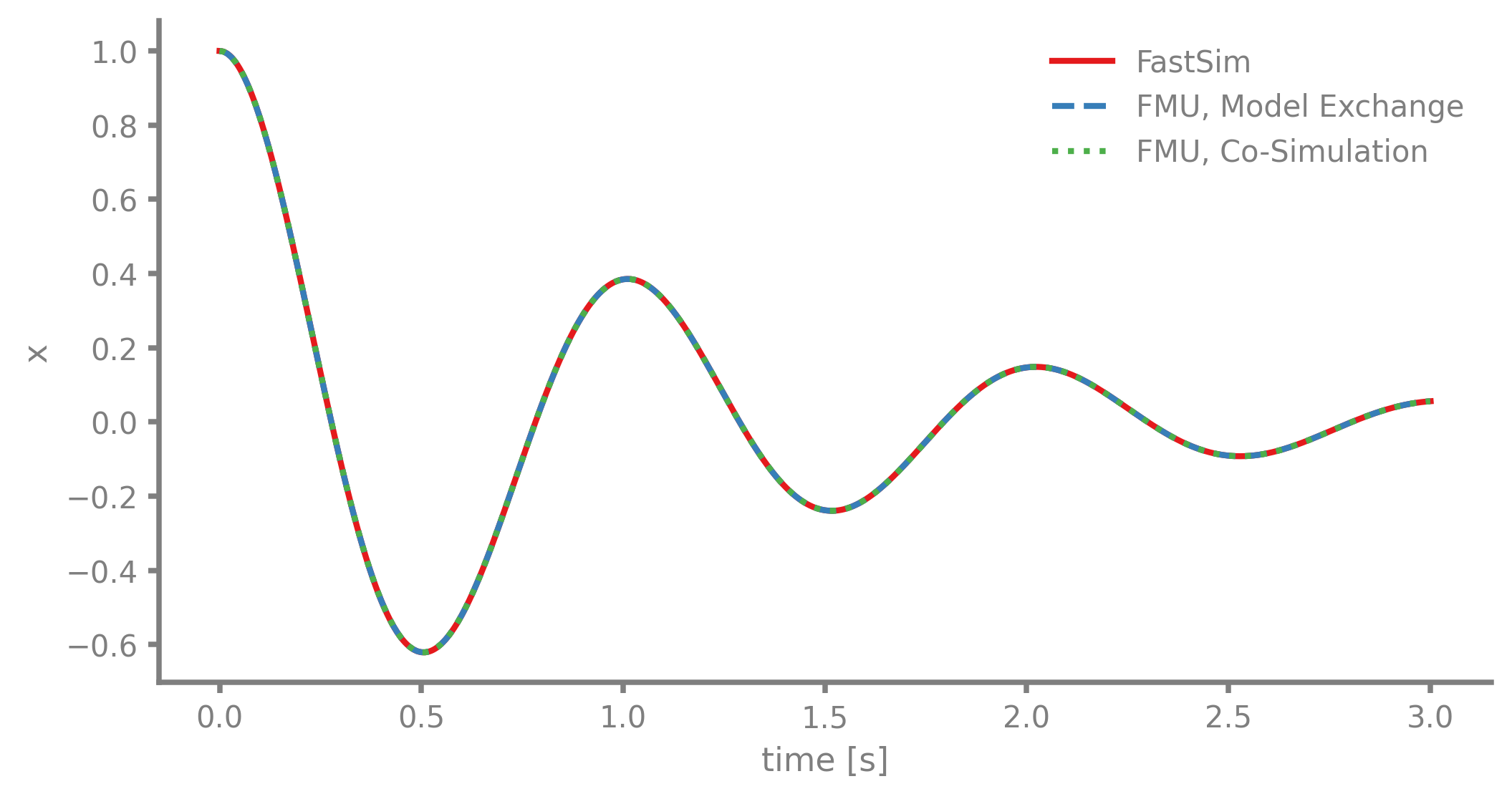
FMPy integrates the FMU with its own solver — CVode here, which FastSim never runs.
Co-Simulation
The same archive, the other way round: the FMU steps itself and FMPy only advances the clock.
Results
Verification
Against the closed-form solution, which involves neither the FMU nor FastSim.
FastSim                worst |x - analytic| = 3.206e-11
FMU, Model Exchange    worst |x - analytic| = 6.151e-09
FMU, Co-Simulation     worst |x - analytic| = 2.374e-11
Exporting a Subsystem
A whole simulation is a closed model — no inputs, nothing to wire it to. A Subsystem is the other case: a component with ports, which becomes an FMU with real input and output variables that someone else can drop into their model.
The component here is a driven spring-mass-damper: force in, its state out.
MATHDISPLAY0ENDMATH
The exported component has an input variable — this FMU is not self-contained, it is meant to be connected. Its outputs are the plant's, position first.
  output   ODE_y0
  output   ODE_y1
  input    in
Verification
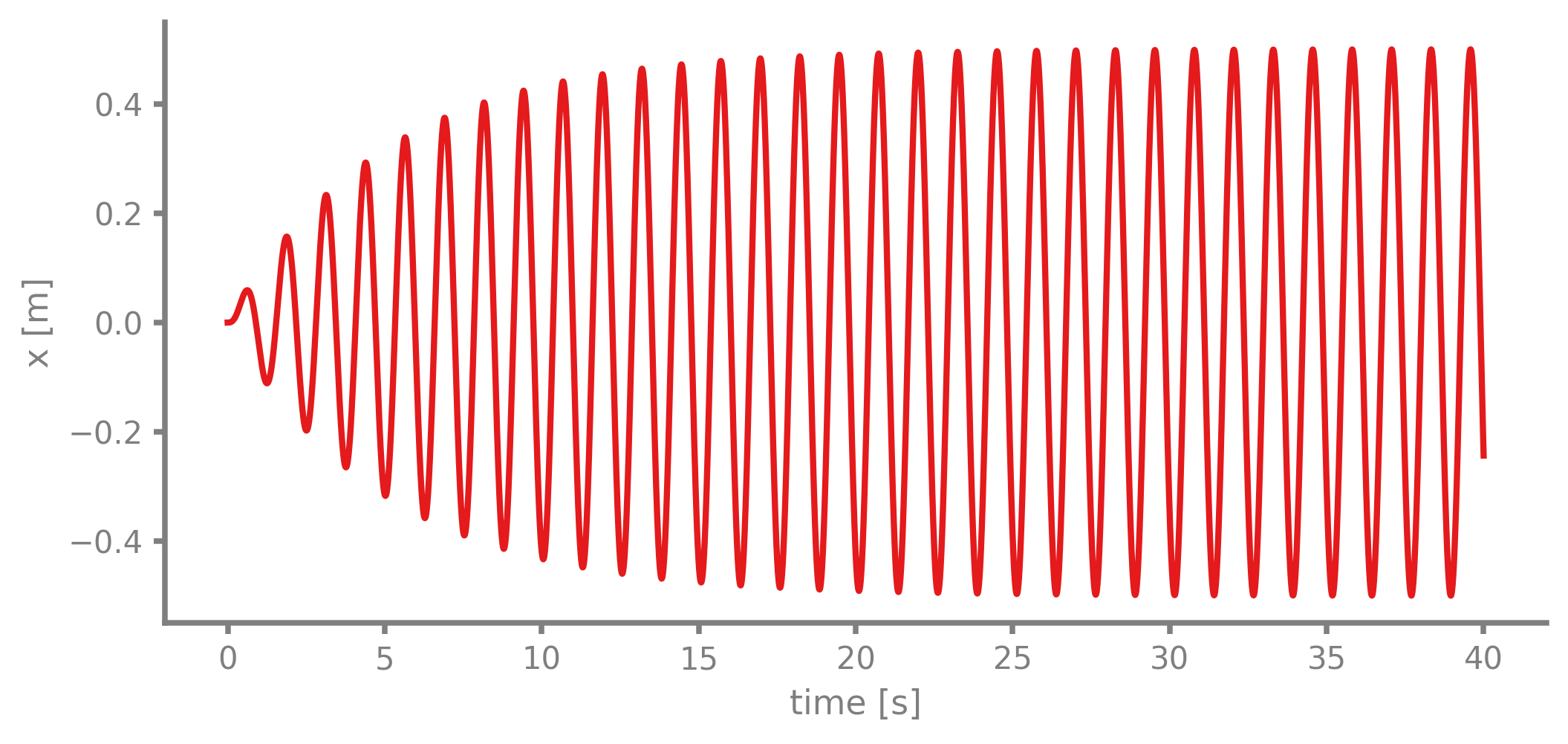
Driven at its undamped natural frequency MATHINLINE1ENDMATH, the steady-state amplitude of such a component is known:
MATHDISPLAY0ENDMATH
measured steady-state amplitude : 0.499809 m
F0 / (c * omega_n)              : 0.500000 m
Published FMUs
The two FMUs from this page are published in the repository under
fmus/, each with a
reference solution (_ref.csv / _ref.opt / _in.csv) so other tools can
import and compare. scripts/export_reference_fmus.py regenerates them, and
scripts/check_exported_fmus.py replays this page's comparison end to end.